Education
Teaching Biology in 3D: Building Interactive Cell Viewers with Three.js
An atlas of interactive 3D cell models where students rotate, zoom, and click on organelles to learn how they work. The rod photoreceptor even fires photons.
2 March 2026 · 8 min read
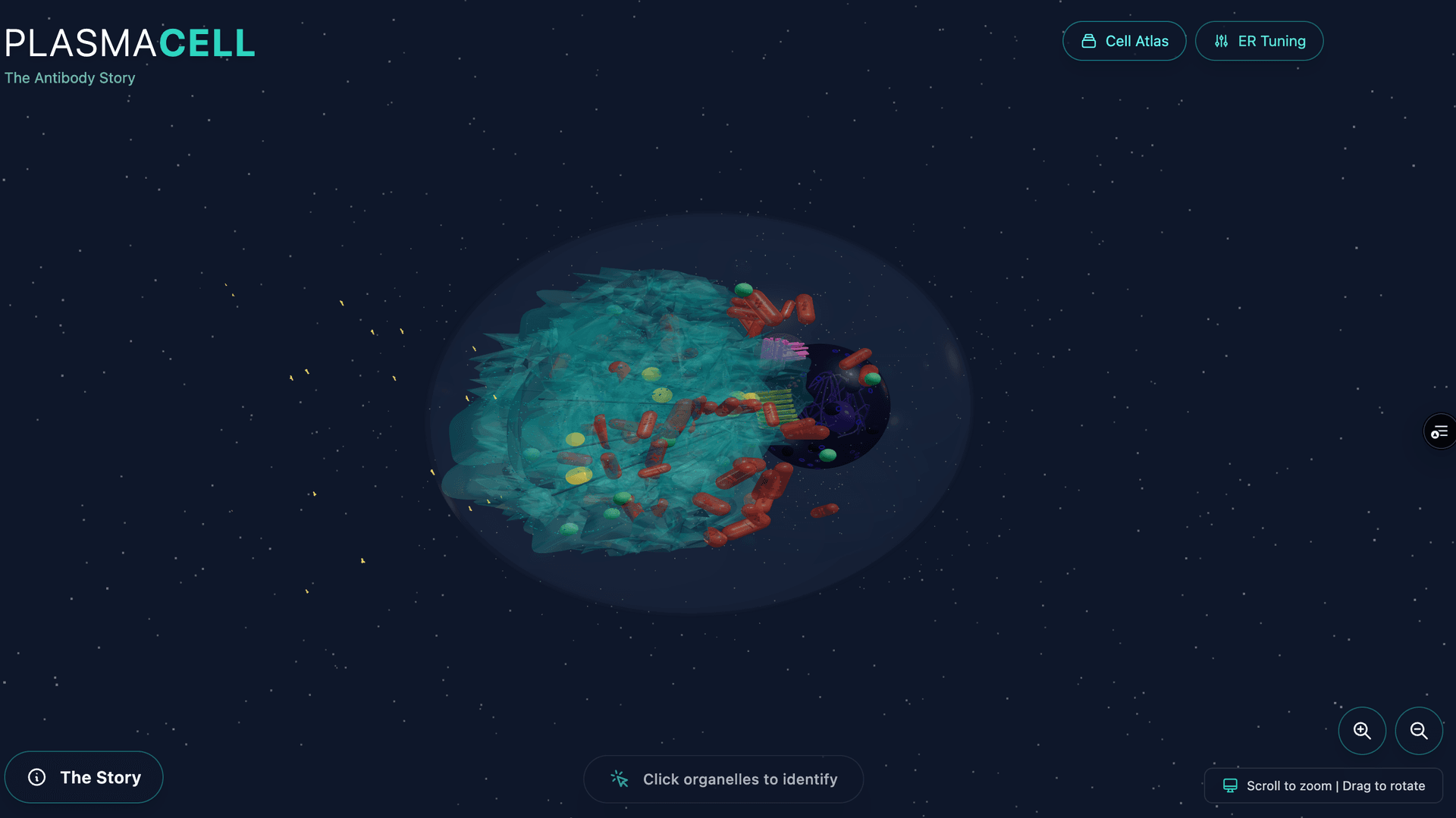
Biology textbooks show cells as flat diagrams with labeled arrows. The mitochondria is an oblong blob. The endoplasmic reticulum is a stack of wavy lines. The cell membrane is a circle. These diagrams are useful abstractions, but they teach students to think of cells as two-dimensional. Cells aren’t flat.
CellAtlas is an attempt to fix this. I started building it in early December 2025, and three months later it’s a growing atlas of interactive 3D cell models, viewable in any web browser, where students can rotate the cell, zoom into organelles, click on structures to learn what they do, and watch biological processes animate in real time. Nine cells so far, each built procedurally in Three.js.
The Cells
The atlas currently includes: a plasma cell (the antibody factory), a red blood cell, a macrophage, a muscle fiber, a neuron, a kinesin motor protein walking along microtubules, a keratinocyte (skin cell), a plasmodium (slime mold with procedural growth), and — the newest and most complex — a rod photoreceptor.
Each cell is chosen to teach something different about cellular biology. The plasma cell shows how the entire cell reorganizes around a single mission (producing antibodies) — its cytoplasm is dominated by massive rough endoplasmic reticulum. The red blood cell shows radical specialization: it ejects its nucleus and organelles to become a pure hemoglobin delivery vehicle. The kinesin shows molecular-scale mechanics: a two-legged protein literally walking along a microtubule highway, carrying cargo.
The Pipeline: Procedural Geometry
Every cell is built procedurally in Three.js — no imported 3D models. Each organelle is constructed from geometric primitives: spheres, toruses, lathes, instanced meshes. The dimensions are scaled from real electron microscopy data, though ribosomes are enlarged about 100x for visibility — at real scale you’d never find them.
The advantage of procedural geometry over imported models is control. Every parameter is tunable in code: the number of ER folds, the density of ribosomes on the rough ER, the thickness of the nuclear envelope. The plasma cell has real-time sliders for ER folding parameters so you can see how the structure changes. You can’t do that with a static mesh.
Everything is translucent by design, so students can see through the cell membrane to the organelles inside, and through the mitochondrial outer membrane to the cristae within. Interaction comes from Three.js Raycaster for click detection, info panels for each structure, and procedural animations for biological processes.
The Transparency Hierarchy
Getting transparency right in WebGL is surprisingly hard, and getting it righteducationally is harder. The system uses a strict opacity hierarchy:
- Cell membrane: 10% opacity (barely visible, establishes boundary)
- Nuclear envelope: 50% opacity (see the chromatin inside)
- Organelle membranes: 40–70% opacity (see internal structure)
- Internal details (cristae, cisternae): 60–80% opacity (visible through outer membranes)
Every material uses MeshPhysicalMaterial with depthWrite: false and side: DoubleSide. Without depthWrite: false, transparent objects occlude each other incorrectly — you get black patches where two transparent surfaces overlap. It’s a detail that took hours to get right and is invisible when it’s working.
The color palette is consistent across all cells: blue membranes, purple nuclei, turquoise ER, gold Golgi, red mitochondria. Students who learn the plasma cell immediately recognize organelles when they open the macrophage.
The Rod Photoreceptor: Simulating Vision
The rod photoreceptor is the most complex viewer and the one I’m proudest of. Rods are the cells that detect light in your retina — each one contains about 800 stacked membranous discs loaded with rhodopsin, the light-sensitive protein. When a single photon hits a rhodopsin molecule, it triggers a biochemical cascade that ultimately changes the cell’s electrical signal.
The viewer simulates the full phototransduction cascade with a three-state state machine:
Dark state: Ion channels are open. A constant stream of glutamate particles (30 instanced amber spheres) falls from the synapse toward the bipolar cell below. This is the “dark current” — counterintuitively, the rod’s default state ison, continuously releasing neurotransmitter.
Photon absorption: Click “Fire Photon” and a photon mesh descends through the outer segment. When it hits a target disc, a visual cascade spreads outward at 80 discs per second — disc colors shift from purple to grey as ion channels close. The glutamate stream decelerates and fades. The bipolar cell flashes briefly with an emissive response. Status indicator switches from amber (“Channels open”) to blue (“Channels closing — Signal reduced”).
Recovery: After two seconds, the dark current gradually resumes. Disc colors interpolate back to normal. Glutamate particles reappear and accelerate. The cell resets.
The neighboring cells are visible too: the retinal pigment epithelium above (a brown slab with melanin granules that recycles the spent rhodopsin), ghost outlines of adjacent rods at 10% opacity, and the bipolar cell below with its dendrite reaching into the synaptic invagination.
Making the Invisible Clickable
Most organelles are too small to click on at a realistic scale. Ribosomes are 25 nanometers across. Even enlarged 100x, they’re tiny targets. The solution: invisible hitbox spheres, larger than the visible structure, positioned at the same coordinates. The raycaster detects clicks on the hitbox; the info panel references the organelle.
Each clickable structure has an educational content entry with a title and a 100–250 word description that explains both structure and function. The plasma cell’s rough ER entry explains that it “dominates the cytoplasm” because the cell has repurposed itself as an antibody production line. The rod’s connecting cilium entry notes the “9+0 microtubule arrangement” and that it’s the only connection between the inner and outer segments — a structural bottleneck that shapes the cell’s entire physiology.
A dynamic scale bar at the bottom updates on zoom, showing actual micrometer scale. Students can see that the nucleus is 5 micrometers across while a mitochondrion is 0.5 — the spatial relationships that textbook diagrams flatten away.
Procedural Animations
But the real payoff is animation. The atlas uses several procedural animation systems:
- Vesicle transport — Cargo follows CatmullRomCurve3 paths along microtubule highways (visible in the plasma cell’s secretory pathway)
- ER membrane dynamics — Layered sine waves create organic folding motion
- Ribosome translation — A walking motion with protein chain growth at the exit tunnel
- Glutamate particle system — 30 instanced spheres with physics-based falling, state-driven visibility
- Phototransduction cascade — Color wave propagation through the disc stack at controlled speed
These aren’t just decorative. The vesicle transport animation teaches the secretory pathway: protein made in the ER, packaged in the Golgi, transported to the membrane. The animation makes the pathway visible as a spatial journey through the cell, not an abstract flowchart.
What I’ve Learned
Building nine cells has taught me that the hard part isn’t the geometry or the rendering. The hard part is deciding what to show and what to hide. A biologically accurate cell model would be an incomprehensible tangle of molecules. An educational model needs to show just enough to build the right mental model — and hide everything else.
The transparency hierarchy is the key pedagogical decision. Making the cell membrane nearly invisible says: “the boundary matters, but look inside.” Making mitochondrial cristae 80% opaque inside a 40% opaque outer membrane says: “there’s structure within structure.” Getting the opacity right took most of the time.
The rod photoreceptor taught me something else: students remember processes, not parts. The static version of the rod — here are the discs, here is the synapse — is informative. The animated version — fire a photon and watch the cascade close ion channels and stop glutamate release — is memorable. You can watch the disc stack do something. That’s the difference.
Next cells on the list: a hepatocyte (the liver’s chemical factory), a pancreatic beta cell (insulin secretion), and an osteoclast (bone resorption). Each one teaches a different lesson about how cells specialize.
How It Was Built
The project started in December 2025 with a single prompt. Nine sessions and 438 prompts later, the atlas has nine cells. Each one was built through Claude Code — the procedural geometry, materials, animations, and interaction design all happen in conversation. Here’s how it actually went:
> can you make a new github repo for plasmacell?
# Dec 5 — fighting the ER
> the ER shapes need lots of folds and convolutions, you know?
> now add internal structure to mitochondria and nucleus and
> make their membrane 50% opaque. default cell membrane opacity
> 10% and ER 20%
# Dec 7 — six cells in a weekend
> red blood cell
> macrophage
> make the neuron
> ok, then make a skin cell?
# Dec 8 — refactoring for reuse
> make a common set of organelles that can be used across cells,
> with the plasma cell as base. like refactor everything
# Jan 1, 2026 — the slime mold
> make it branch-like and pulsing like cytoplasmic streaming
> ditch the green outer shell, make the whole thing more like a
> tree branching, L-systems styled structure in yellow on black
# Feb 28 — the rod cell
> let’s do the rod cell
> it is very dark. I don’t see membrane or context.
> nothing happens when I click fire photon
# Mar 2 — getting the biology right
> I feel like it should be clear that it maximally fires in the
> dark (right?) and that light inhibits firing
> the firephoton button and auto firing doesn’t work for me
> still not giving me the contrast I need... looks so dark
The pattern is the same across all nine cells: describe what you want, deploy, look at it, say what’s wrong, iterate. The persistent complaints are always about visibility (“it is very dark”), biological accuracy (“are the sizes proportional to real sizes?”), and interactivity (“nothing happens when I click”). The “maximally fires in the dark” prompt is where the rod cell’s three-state state machine originated — getting the counterintuitive biology right required going back and forth between the code and the neuroscience until the simulation matched reality.
The atlas is live and open source at github.com/JDerekLomas/blendercell.